- The adult is eating a restricted or unhealthy diet (e.g. only eats toast):
- they may have difficulty in getting to the shops to buy food
- they may be able to prepare food but have swallowing problems.

Technology Enabled Solutions is any device, equipment, gadget or gizmo that helps to bridge gaps in a person’s ability to live the full, independent and fulfilling life they want to. Assistive technology can help many different people in different ways but for people who are ageing with a disability, the main goal is to reduce reliance on other people and care systems and to help them to stay in their homes for longer.
Assistive technology can help many people in different ways, whether it be someone living with dementia to remember certain things, a stroke survivor to communicate, a visually impaired person to access the internet, or even just a healthy older person to help secure their home.
Assistive devices that are most likely to help a person who is ageing with a disability, are usually electronic gadgets. Health can be improved with medication reminders, pill dispensers, and telehealth systems. Independence and comfort might be focused on with virtual assistants, visual and communication aids, and memory aids. Assistive technology can also be used for home safety and security – smart smoke alarms and doorbells, automated lighting and water-overflow devices to name a few.
Do you know enough about Technology Enabled Solutions (TEC) to advise the people that you support? Would the person you support and or your staff team benefit from seeing and trying out some of the equipment?
Is there somewhere that the person could be supported to attend to look at the equipment or could Livity Life be invited to the service/home to talk about the value of TEC in more detail. You can help the person to be ready for their review discussion, with suggestions of potential apps or pieces of equipment which the reviewer may be able to obtain funding for.
"How could you, as a Service Provider, promote the use of TEC to ensure that support provided is the least restrictive option and works towards increasing and maintaining independence?"
Here are some examples of situations where TEC could be considered as a useful solution:
Have a look at these case studies which will help inspire you to think more creatively about TEC solutions with the people you support.
Issue
“A” lives in supported living. She forgets to eat sometimes and when she is prompted, struggles with utensils due to shakes and tremors. She is at risk of burns and cutting herself. “A” also has difficulty reading the written tprint, so struggles with cooking instructions and recipes.

Possible solutions
Using an Alexa show allowed “A” to be prompted to eat. Using adaptive cutlery and kitchen utensil, allowed “A” to prepare & cook safely. “A” used the Alexa show to “show" various cooking videos, which she was able to follow. As well as using the phone App, "Seeing AI" to read aloud for her.
Issue
B gets frustrated around time and would love to be independent around their personal care. They have the skills to manage, just struggle with staying in the shower too long and the order of the tasks.
B uses water to help them regulate.
B also leaves taps on and has been known to flood bathrooms.

Solutions
A motion activated memo minder was placed in the bathroom, when B walked in, it said don’t forget to check your getting ready planner” this was simply a Talking Photo Album that had audio and visual instructions of what to do.
Page one had a photo of “B” washing their face and the audio instruction said “wash face” the next photo was brushing teeth, and the audio said “brush teeth for 2 mins, set your Timer”, this allowed “B” to know what was happening and for how long. B decided to use this Timer in the shower too, as he found it helpful. Magi plug were used in plugs, to help prevent flooding.
Issue
“C” has COPD, is oxygen reliant, and uses a wheelchair.
One of their medication means that they are frequently needing to go to the toilet.
Their partner worries when they go out that they won't be near a toilet, worries about transport and the cost of trips.

Solutions
Now they plan ahead when they go out – knowing where toilets are and looking at Public Transport has taken the stress out of days out, knowing where is accessible, is key to a good day out.
Issue
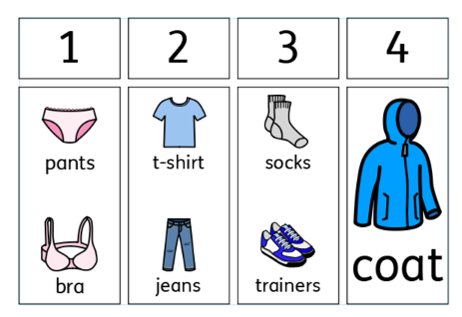
D has an acquired brain injury, they struggle with getting dressed: what to wear at what time of day, what order to put the clothes on. As well as the physical aspect of getting dressed.
Solution
Using colour coded hangers with images allowed “D” to know if the item was suitable for sunny or rainy days, giving independence in choice.
Adapting some clothes using Velcro, not buttons took the frustration out of dressing, and supported the goal to be independent.
Using planners, helped to show the order
Issue
E has early onset dementia and is at risk of letting people, increasing their risk of being cuckooed as well as a high risk of walking with purpose.
D has left the cooker on a few times & She also doesn’t remember to turn the lights on and is at risk of falls.
And lives in an area with frequent power cut.
Solution
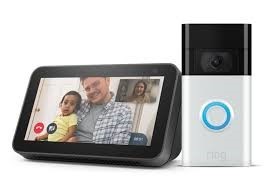
family have a smart speaker & Ring doorbell so they can see who is at the door,
family completed a Herbert Protocol which helped the police should D not return,
Cadent Gas were called to put cooker locker valves on, and she was registered as priority customer
smart speaker turns the lights on and are on a timer, which means the home is safer for her.
Issue
F has an acquired brain injury and struggles, daily. He struggles with keeping his home clean and tidy, remembering to paying bills, keeping up with family and friends. He misses appointments and feels socially isolated. He see his child at the weekend and is looking at building confidence by volunteering.
Solution
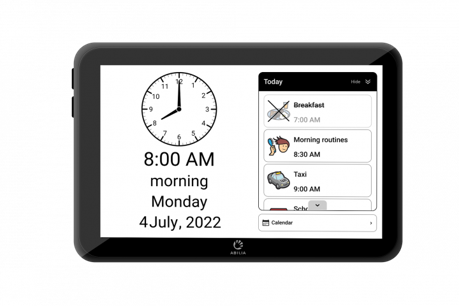
Cary-base allowed F to see the time and know if it was am / pm, reading this out for them.
This device also showed day's events, prompting and reminding as needed. Visually and auditory.
Friends and family could help with this
planner by logging in via My Abilia.
Handicalendar helped when F was out and about, giving them the confidence to go out on their own, using public transport independently to go and collect their child, joining clubs and looking for volunteering.
Visuals

Click on the drop down boxes below to see examples of visual tools
Using easy read allows support staff to talk through things like letters and explain appointments, using short, jargon free text, backed up with images which explain the context.
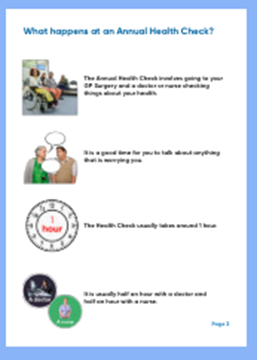
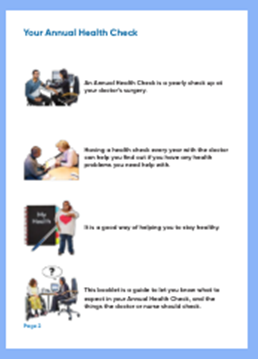
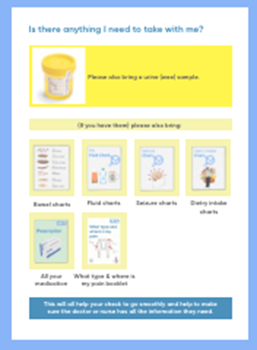
Try typing ‘easy read’ into a search engine on the internet.
To finely tune your search type “easy read” and then add a key word, or two, ie dentist, super market, appointment etc.
Social Stories were originally devised as a tool to help Autistic individuals better understand the nuances of interpersonal communication so that they could "interact in an effective and appropriate manner". They are equally as relevant for other people with disabilities.
Social stories help explain social situations to people and support them to learn ways of behaving in these situations. These stories are sometimes called social scripts, social narratives, or story-based interventions.
Social stories can be used to help explain social situations, for example attending an Annual Health Check appointment. Pictures can be taken ahead of the visit, one of the transport being used, one of the doctors building, one of the reception desk etc. Then the pictures are put into a story, to show exactly where the person is going, what will happen there and what ‘the journey’ would look like.
This helps to take the fear out of the unknown.
Try searching for ‘social stories’ on the internet to find a range of resources that will help you and your staff teams utilise these with the people you support.
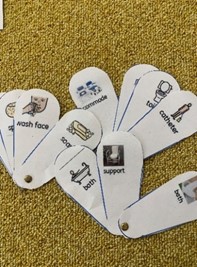
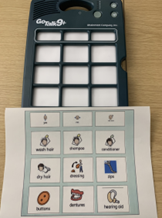
Using fans / mats / devices allows staff to interact with people by asking questions and supporting them to respond with an image.
This can be used every time the question is asked ‘what would you like to drink?’ This then supports the person having choice and control at every opportunity.

There are a variety of technology solutions that will help you manage risks and meet needs when you are supporting more than one person in a home setting or when you want to give people some time to be alone.
You might worry that you won’t hear the person if you’re not in the same room or they wouldn’t be able to call for help if needed.
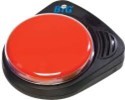
In those circumstances you could consider a BIGmac button that can be programmed to say “Jenny Needs you”, ‘’Jenny needs the toilet’’ and they could just press the button and you would be able to hear them.
A ‘Go Talk’ is another device that can have basic commands programmed like “please take me to the bathroom” “please can I sit elsewhere” as well as meal choices and other requests that they may need.
A Portable telecare alarm can receive telecare alerts and display not only the type of sensor activated but also either the location of the sensor and/or the name of the person the sensor has been assigned to. So connecting Jenny’s bed sensor mat to the telecare alarm, with an on screen message to accompany the alert saying, ‘Jenny’s bed sensor’ will indicate to your staff member that Jenny may need some help.
The North Thames Regional Environmental Control Equipment Service (RECES) provides electronic assistive technology to severely disabled people to enable them to live more independently at home.
This is electronic equipment which enables remote control of appliances at home by an easy access controller for those with very limited hand or other functional movement, where standard controls are not suitable. This may arise from a medical condition such as Multiple Sclerosis, Motor Neurone Disease, Muscular Dystrophy, Spinal Cord Injury, Cerebral Palsy or severe Arthritis.
Find out more here - Environmental Control Service for North Thames (RECES) | The Hillingdon Hospitals NHS Foundation Trust (thh.nhs.uk)
Remap is the UK’s only charity providing custom-made equipment, free of charge for disabled people.
Their mission is to improve the quality of life for people who experience short or long-term disability through infirmity, illness, or ageing. They do this by making and adapting equipment to meet the unique needs of individuals at no cost to them.
The equipment, produced by their team of dedicated volunteers, can help with day-to-day tasks such as mobility, personal care or eating. Or it can enable the person to pursue a hobby or ambition, such as participating in a sport or art activity.
Can you think of people who you support that would benefit from the services of Remap?
Find out more here - Remap
The following information was provided by Livity Life, the partner organisation working with ECC to deliver assistive technology solutions to support people to maintain their independence.
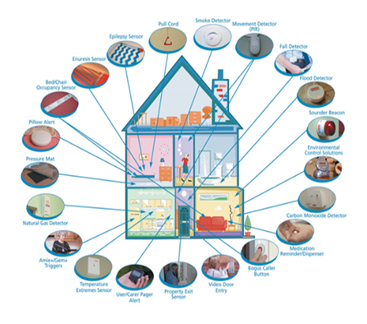
Technology Enabled Care (TEC) Services, also known as ‘assistive technology’ or ‘telecare’, uses the latest technology and innovations to help service users remain safe, comfortable, and independent in their homes. TEC supports people to achieve their personal outcomes and provides peace of mind to family/carers.
Livity Life provides assistive technology services on behalf of local authorities across the UK, including ECC. We have a highly skilled team handling calls from our telecare alarms and a customer service team who prescribers can speak to for support.
We work with a variety of manufacturers and community partners to provide a range of sector-leading TEC solutions that give service users the confidence to live safely and independently at home
Livity Life uses the CARES catalogue system where prescribers can view a range of available TEC. If TEC is more specific, or additional support / advice is required a referral can be made to the Occupational Therapist based at Livity Life who can complete assessments and offer guidance. If prescribers are looking for a specific item of TEC that isn’t on the CARES catalogue a Special or Non-catalogue order can be made.
CARES is continuously being updated as new TEC comes onto the market so it’s always worth checking (even if you are familiar with CARES) whether the item you are looking for has been added.
Contacting Livity Life Healthcare:
Telephone - 0330 174 2869 (Customer Services)
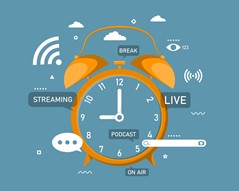
The multimedia alarm clock will display the time like a normal clock, there are options for which clock display you prefer. You can easily set alarms to go off at certain times and intervals i.e. Daily, Monthly, Weekly, Yearly. When the alarm time is reached, the multimedia alarm clock will display high quality multimedia content on its full HD screen. This could be a video, audio or an image (or all 3). You are free to add your own media, there is a also an online app to allow you to record videos and take pictures and send them to your multimedia alarm clock over the internet. Media can also be added with a USB drive.

Worn like a watch the GPS Watch is the ideal solution for users who would prefer their personal alarm to be discrete and within easy reach at all times. With a range of features, GPS tracking and reliable communication capabilities, the GPS Watch significantly enhances safer independence. The watch displays the time, date and day display and allows two-way communication like a mobile phone.
Some people simply don’t want the added complications of a modern day smartphone. A simplified mobile handset allows the user to make calls to their pre-programmed numbers (up to 12) and receive calls from anyone who has been given their number. It can be customised with names or pictures, making it a truly personal communication device. And that’s it. No complications, no unnecessary functions and no need for lengthy user guides.

Customise morning routines to wake up with lights and an alarm that plays favourite songs. Glance at the calendar or the news, catch up on a podcast, make video calls to friends and family, set timers, and stream music or series all using just a voice.

Video calling devices are dedicated pieces of equipment for simple video communication. These make video calling easier for older people and/or those with learning disabilities, than using apps or software on smartphones, tablets or laptops.
Do you feel you know enough about Technology Enabled Solutions (TEC) to advise the people that you support?
Would the person/your staff team benefit from seeing and trying out some of the equipment?
Is there somewhere that the person could be supported to attend to look at the equipment or could a TEC provider be invited to the service/home to talk about the value of TEC in more detail?
You can also help the person to be ready for their annual review discussion, with suggestions of potential apps or pieces of equipment which the reviewer may be able to obtain funding for.